Embedly
Better embeds = Better Conversations ✨
 [Embedly Discord Bot]
Social media links in Discord look terrible. Embedly fixes that.
When you share a Twitter, TikTok, or Instagram link in Discord, you usually get broken previews - no images, missing context, or just "content unavailable." I built Embedly to solve this problem. It's a Discord bot that automatically replaces broken social media previews with rich, complete embeds that actually show the content people are trying to share.
The Problem
Discord's native link previews for social media are notoriously bad. A tweet might show up as just a title with no image. A TikTok might not load at all. Instagram posts often say "content unavailable." For communities that share a lot of social content, this makes conversations frustrating and hard to follow.
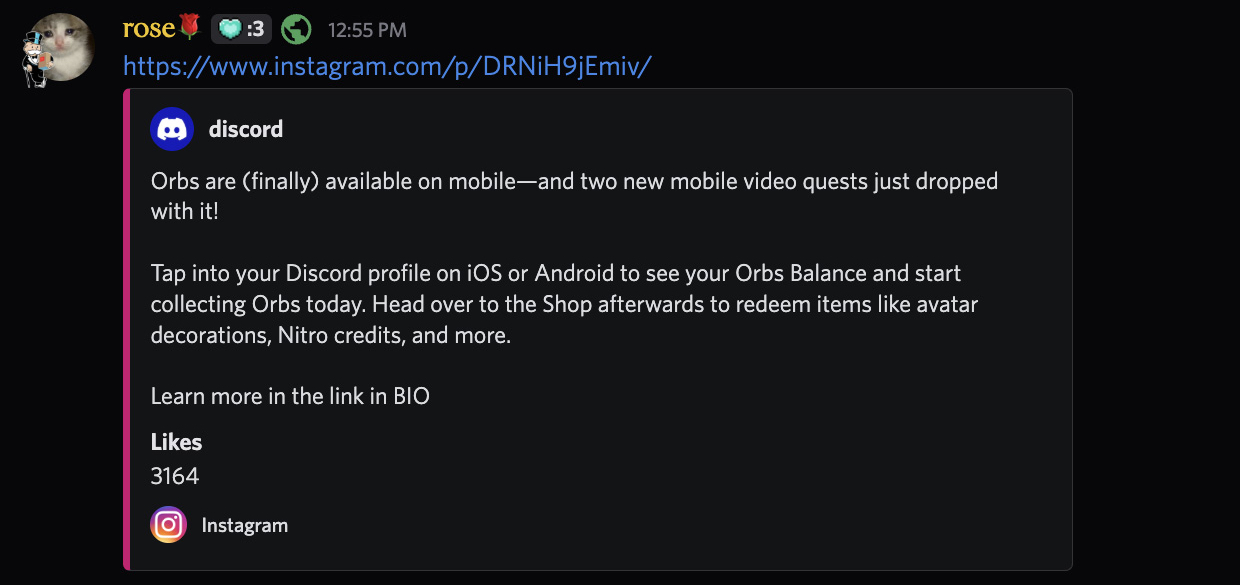 [Broken Discord embed - Instagram link showing no images]
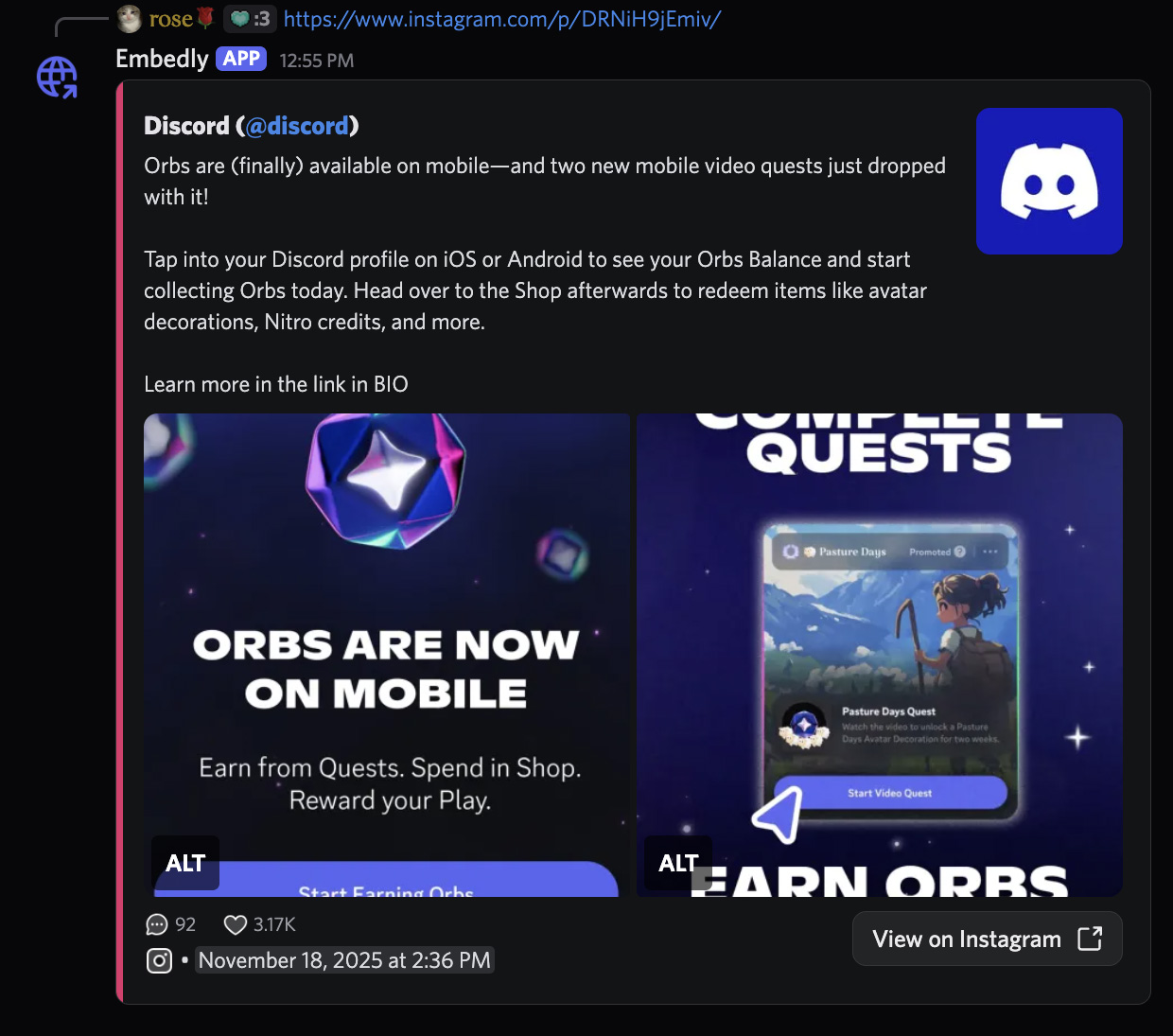 [Fixed Embedly embed - Full Instagram post with images]
How It Works
Embedly monitors messages in Discord servers where it's installed. When someone posts a supported social media link, the bot quickly processes it and posts a properly formatted embed with the full content - images, videos, captions, author info, everything.
The bot supports multiple platforms including Twitter/X, TikTok, and Instagram. Each platform required understanding their URL structure and either using their API or finding reliable embed services to pull the full content.
Technical Deep Dive
Embedly is built as a TypeScript monorepo using Turborepo, with separate packages for the Discord bot, API server, embed builder, platform parsers, and shared types. The architecture needed to handle some tricky challenges: Instagram actively blocks scraping attempts, Twitter's API requires careful rate limiting, and TikTok has multiple URL formats to support.
The embed system uses Discord's new components v2 API to create rich, interactive messages. Here's how the builder constructs a Twitter embed with reply context:
// Building a Twitter reply embed with parent context
const container = new ContainerBuilder().setAccentColor(
  EmbedlyPlatformColors.Twitter,
);

// Show parent tweet first
const parentSection = createAuthorSection(
  embed.replying_to.name,
  embed.replying_to.username,
  embed.replying_to.profile_url,
  embed.replying_to.avatar_url,
  embed.replying_to.description,
);

container.addSectionComponents(parentSection);

// Add separator
container.addSeparatorComponents((builder) =>
  builder.setDivider(true).setSpacing(SeparatorSpacingSize.Large),
);

// Show the actual reply
const replySection = createAuthorSection(
  embed.name,
  embed.username,
  embed.profile_url,
  embed.avatar_url,
  embed.description,
  emojis.reply,
);

container.addSectionComponents(replySection);
The flag system lets users customize how content appears. For example, media_only mode bypasses all text processing and returns just the media gallery:
static buildMediaOnlyEmbed(embed: Embed, hidden?: boolean) {
  // Priority: quote tweet media > main tweet media > parent tweet media
  const media = embed.quote?.media || embed.media || embed.replying_to?.media;

  const container = new ContainerBuilder();
  container.setAccentColor(EmbedlyPlatformColors[embed.platform]);

  if (hidden) {
    container.setSpoiler(true);
  }

  if (media) {
    container.addMediaGalleryComponents((builder) => builder.addItems(media));
  }

  return container.toJSON();
}
Each platform requires a custom parser to handle its specific quirks. The Twitter parser reconstructs reply chains by fetching parent tweets and transforming them into nested embed structures:
if (tweet_data.replying_to_status) {
  const reply_tweet = await this.fetchPost(tweet_data.replying_to_status);
  const reply_embed = new Embed(this.transformRawData(reply_tweet));
  if (reply_tweet.text !== "") {
    reply_embed.setDescription(this.enrichTweetText(reply_tweet.raw_text));
  }
  if (reply_tweet.media) {
    reply_embed.setMedia(
      reply_tweet.media.all.map((media: any) => ({
        media: {
          url: media.url,
        },
        description: media.altText,
      })),
    );
  }
  embed.setReplyingTo(reply_embed);
}
The whole system is designed to fail gracefully. If a platform is down or returns unexpected data, the builder uses optional chaining and nullish coalescing to prevent crashes:
// Safely handle missing data
const author_name = embed.replying_to?.name ?? embed.name;
const media = embed.quote?.media || embed.media || undefined;
const stats = embed.replying_to?.stats ?? embed.stats;
All markdown content is properly escaped to prevent formatting issues in Discord:
import { escapeMarkdown, escapeHeading } from "@discordjs/builders";

// User-generated content is escaped
const safeDescription = escapeMarkdown(embed.description);
const safeAuthorName = escapeHeading(`${embed.name} (@${embed.username})`);